1. Learn about the model & start prediction
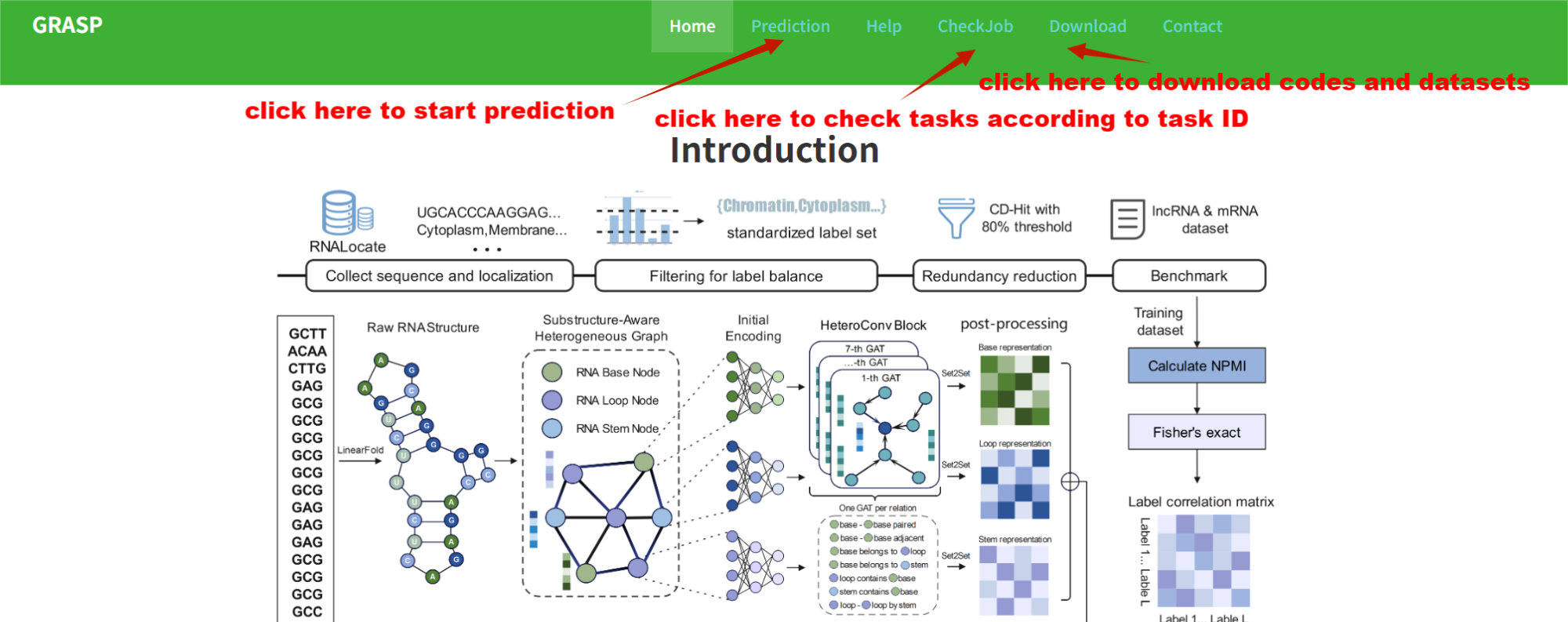
This website helps you run GRASP RNA subcellular localization predictions and follow up on your work. From the top menu you can use:
- Prediction — choose lncRNA or mRNA, submit FASTA sequences, and start a prediction job.
- Help — step-by-step guidance (this page) for how to predict, read results, and query jobs.
- Download — open the Download page for a link to the GRASP source code on GitHub for local installation or study.
- CheckJob — look up a job by its Job ID to open the status or result page without bookmarking the URL.
Use Contact if you need to reach the maintainers. Together, these sections cover end-to-end use: submit → wait or check status → view or download results.
2. Prediction

Choose RNA type first. Use the RNA Type control before submitting: lncRNA and mRNA use different trained models. The type you select must match your sequences, because each model predicts over its own set of subcellular compartments (column names in your result table come from that model).
Supported compartments by type (as in the output CSV / result table):
- lncRNA — Cytoplasm, Cytosol, ExtracellularVesicle, Membrane, Mitochondrion, Nucleolus, Nucleoplasm, Ribosome.
- mRNA — Chromatin, Cytoplasm, Cytosolsub, Membrane, Microvesicle, Nucleolus, Nucleoplasm, Nucleussub.
Then paste or upload FASTA (sequence IDs in headers), optionally leave an e-mail for notification, and submit. The site assigns a Job ID and queues the run; you may wait on the result page or reopen the job later via CheckJob.
3. Get the prediction results.

When the job completes, the Result Table lists every submitted sequence in one row each:
- Seq_ID — the identifier from your FASTA header (one row per sequence).
- RNA Type — the type you chose for that job (lncRNA or mRNA).
- One numeric column per compartment — the model’s predicted probability for that sequence in that subcellular localization (values are shown for all compartments; the set of columns matches the RNA type you selected).
Use the table toolbar Export to download the full matrix (e.g. CSV/Excel) with the same columns. The export contains raw probabilities for every sequence and compartment, so you can apply any custom threshold (or multi-threshold rules) in R, Python, or Excel for downstream filtering, enrichment, or plotting — the website does not impose a single cutoff on the exported file.
Please also save copies in time: on-server result files may be removed after the retention period noted in the tips on the result page.
Wikipedia links in headers: On the completed job page, each subcellular-localization column title is a link to a short English Wikipedia article (or a Wikipedia search for uncommon labels) so you can quickly recall what that compartment refers to. Links open in a new tab and are for reference only.
4. Query your jobs.

On CheckJob, enter the Job ID from your submission e-mail or the prediction page to jump to the same job’s status and results. Keep the ID if you may return after closing the browser.
Example use case
A user inputs an RNA sequence and obtains high predicted probability in the nucleolus. This may suggest involvement in ribosome biogenesis or RNA processing. Similarly, cytoplasmic localization may indicate roles in translation or post-transcriptional regulation. Together, such examples show how predicted localization provides spatial context and can help generate functional hypotheses.
Building on that context, users can combine GRASP results with external resources (e.g., RMBase, POSTAR3) to check whether potential regulatory elements or functional sites within the input sequence overlap with known modification or binding events that are enriched in the predicted subcellular compartment—supporting exploration of modification sites or RBP interactions in a compartment-aware way. These integrative analyses are not built into this lightweight web server but can be performed straightforwardly alongside those databases.